How Change Blindness Affects User Perception of Websites

We tend to like to think that we are aware of everything going on around us; after all, we are conscious human beings, and we notice changes to our surroundings, right?

Well, not exactly.

In this post, we’ll look at a phenomenon of human consciousness that is subtly affecting the way we actually see the world – and the way in which users look at your website.

Let’s start by taking part in a quick experiment in the video below (and make sure to watch it in full screen!):

Experiments like the one above work like magic tricks, cleverly masking the changes that occur during the switch between what are in fact two quite different images.

Chances are, once you noticed the alterations to the webpage, they became almost impossible to stop staring at. What you just experienced is a phenomenon called change blindness: in order to notice the (not so) subtle alterations to our environment, our attention has to be consciously drawn to them.

What is Change Blindness?

Change blindness occurs when a change in visual stimuli goes unnoticed, especially if our visual attention is not focused directly on the change.

To give you a better idea of what we mean, take a look at this video by NOVA :

Change blindness pops up all over the place. In Luis Bunuel’s seminal 1977 film Cet Obscur Objet du Désir, two actresses were cast in the place of one, symbolically showing that the male protagonist could not understand “the true nature of his lover”. When the film first screened, many viewers (including this article’s author, truth be told) simply didn’t initially notice that the role of the intriguing Spanish vixen was played by two entirely different people.

Why Does Change Blindness Occur?

So far, scientists don’t know precisely why change blindness occurs, but they do have preliminary explanations and know that it carries certain implications:

Change blindness occurs when a change in our visual field is not consciously “attended” to; our eyes are not expecting the change, so they don’t process it.

Visual perception occurs on a two-fold level: First, the optic nerve transfers information about a physical (rather than emotional) change to the visual cortex at the back of the brain. Very soon after this information reaches the visual cortex (for lack of a better theory) subjectivity emerges. Your brain must decide, for example, if it’s seen a change in what it’s looking at, or if it is mistaken. In other words, the real mystery of the way we see things is to build a bridge between the information that the visual system gives to the brain, and how the brain transforms this information into experience.

Kevin O’Regan, visionary neuroscience philosopher at the Centre National de Recherche Scientifique in Paris, explains the phenomenon this way:

“Perhaps the most natural view to take is to suppose that what we have the subjective impression of seeing is not the very sparse, more semantically coded, content of visual memory, but the content of a shorter-lived but higher quality, image-like replica or “icon” of the visual scene. The impression of richness that we have from the world would derive from this high-quality icon. On the other hand, only a small portion of the icon’s contents, namely the parts that have been attended to, would at any moment be transferred into memory and be available for doing tasks like change detection — the rest would be forgotten. This view of visual processing has been called “inattentional amnesia” (Wolfe [1999]): the idea is that we see everything, but forget most of it immediately.”

How Change Blindness Affects Landing Page Optimization

Just as in everyday situations, change blindness plays a role in the way we look at and understand websites. We may think that we are aware of all available information when we arrive on a web page, but the simple fact of the matter is that our brains can only take in so much at once.

In general, there are 3 key lessons to be learnt from how change blindness influences the way users look at your website:

1. Content and design elements you think are important may go unnoticed by users

Back in 2010, UX magazine posted a brief article alerting UX professionals to the role of change blindness in UX; “What are we failing to capture when observing people using the products we design?”, queried the author.

When optimizing a website, everyone involved makes hypotheses about what needs to change on a page; perhaps it’s the copy, a button colour, or a background pattern. Coming up with testing ideas is often based on intuition and experience, but even an experienced designer or optimization expert is likely to miss key problems. In fact, a study from the University of Copenhagen showed that experienced web designers could only predict how a user would view a website with just 46% accuracy.

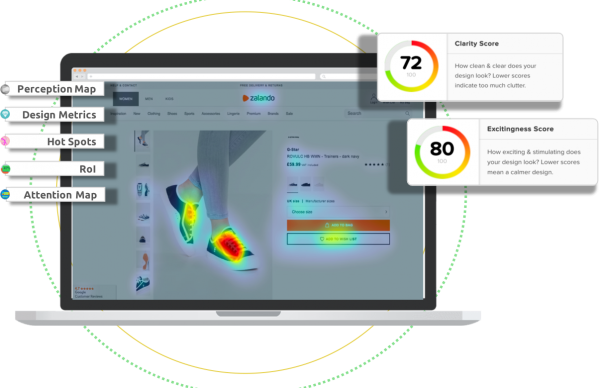
Predictive eye-tracking does an excellent job of solving this problem by removing subjectivity from the testing equation. Heatmaps and other visualizations show what users will initially see based on finely tuned algorithms and years of research – not subjective opinion.

2. Changing One Design Element Affects Everything Around It

Remember the Amazon landing page experiment you conducted beginning of this post? Here are two EyeQuant Perception Maps (before and after the changes) of the Amazon.com homepage featured in the video, predicting what users will see within the first few seconds of arriving on the page:


While three main areas of visual attention remain the same, the illuminated region to the far right changes dramatically with a simple change to the “best sellers” content on the bottom right, from mens’ sandals to beanies and hoodies. Suddenly, attention is pulled away from the grey box entitled “Watch Your Favourite Movies in HD Instantly”, and drawn downward. This is not because users are reacting more emotionally to beanies and hoodies than sandals, but simply because the former produces a larger block of dark colour, thus more easily drawing our eyes toward it.


Herein lies the crux of this lesson: When testing design and content changes on a website, we tend to focus on a single element at a time, such as the colour of a CTA button or the size of a headline; however, the circumstances of change blindness (and the results of an EyeQuant test) show us that small changes to one element also change the way a user looks at anything around that element as well.

When tweaking design elements, it’s crucial to consider not just the attributes of a single element, but how it will alter a user’s gaze on the entire page. Will enlarging the headline draw user attention away from the product image on its left? Will moving the CTA from centre-right to dead-centre draw attention away from the core benefits? The best way to find out is to test, tweak, and re-test until you find the winning combination.

3. We humans aren’t very good at noticing details. If you want an element on your web page to be paid attention to, it needs to stick out right away.

We’ve said it once, and we’ll say it again: If you want potential customers to click something, read something, or buy something…


…You have to draw their attention toward it.

Users won’t perceive existing elements or even substantial webpage changes – even if they are right in front of their eyes. So, how do you draw their attention to the regions of a web page you want them to focus on? Try these steps:

  • Test your website with EyeQuant to see what users see when they first arrive, and what they miss. If the most important content on your site is not visible in the perception map or attention (heat) map, then you have some work to do.

  • Instead of just focusing on single elements – like the placement, size, or colour of your CTA – consider tweaking the areas that surround it. Dull or alter the background colour, adjust the size of surrounding copy, or make some room around your most important elements.

  • Plug your changes into Eyequant, test, rinse, repeat, and optimize.

For a little inspiration, take a look at EyeQuant customer and conversion experts WHOLEGRAINdigital’s optimization process:

To learn more on this fascinating facet of human consciousness and how scientists are studying it, take a look at this this seminal paper by Simons and Rensink, or this talk by pioneer of the science of consciousness (and EyeQuant Scientific Advisory board member) Christof Koch, speaking about the brain, consciousness, and even change blindness:

Deconstructing a 56% Conversion Lift at Big Contacts

Image

Big Contacts – a web-based CRM targeting small and mid-range businesses – are smiling, and no, it’s not just because Spring has finally arrived.

Digital agency Surge Labs published a case study last November showing how they achieved a 56% conversion boost in sign-ups on Big Contacts’ landing page. Especially in a competitive field like CRM, this uplift represents a significant achievement. Here at EyeQuant, we always love a good success story, so we thought we would analyze this one through our own lens.

Here is Version A of Big Contacts’ website. For all intents and purposes, it’s probably not the worst web page you’ve ever seen, which is precisely why it becomes much more fun to analyze.

Image

Surge Labs hypothesized that, in order to better capture potential customers’ attention in such a competitive field, Big Contacts would need to eliminate clutter and focus on one key design strategy: Clarity.

They would achieve this by:

  • Creating white space
  • Focussing on only one call-to-action
  • Improving the user’s navigational path with better organization

Now take a look at the perception maps of the EyeQuant analysis of Version A below:

Image

The value proposition is clearly the element on the page that needs the most work; we can see what the software looks like, but we aren’t immediately aware of the core benefits it offers us. More importantly, perhaps Big Contacts’ greatest benefit – its affordable plans starting at $15 per month –  isn’t even on the page.

Version B of Big Contacts’ landing page corrects these problems beautifully.

Let’s take a look why:

Image

Organization & Flow:

Big Contacts’ value propositions are now clearly lined up in vertical bullet-point form, ending with a big orange CTA button. The improvements to the user’s navigational path are clear, and can once again be immediately gauged using EyeQuant’s perception map:

Image

Now, isn’t that a thing of beauty? 

Not only are the four bullet points immediately visible as the user’s gaze makes its way from the headline to the CTA, but the navigational path also calmly makes stops at an image of the software and an attractive price tag.

The best part? The logo, the headline, the core benefits, the price, and the CTA, are now visible within the first few seconds of a user’s visit to this landing page. Even visual information about the company’s social media presence and its syncing abilities are visible. Impressive.

Colour Consistency:

Surge Labs made an excellent use of colour in Version B of this landing page by choosing consistent three colours to draw attention to urgent information:

  • white for text
  • warm, bright orange for the CTA
  • warm, bright green to highlight the core benefits.
  • Cool blue as a background block colour.

These three colours are set off brilliantly by a cool blue background in which all the most important “above the fold” information is situated.

Most importantly, the use of colour choices is consistent and logical. While in Version A the user had to decipher between two text colours (blue and white), Version B’s text is all white, removing the need for the user to process any unnecessary aesthetic changes. The same could be said for the flashes of green next to the core benefits: by establishing bright green as a color associated with core benefits, the user is able to make instant connections between the price all the way on the far left, and the bulleted core benefits in the mid right.

Grouping Important Information with Colour: 

While too much variation in colour can be distracting to a user’s initial attention, here it has been well implemented. In Version A, a user had to leave the comfortable blue box and choose between one of two CTA’s, creating a visual barrier between the description of the product and its call-to-action.

In Version B, the user’s focus can remain almost entirely in the blue box – it immediately indicates that the user is in a zone that contains important information. 

In previous EyeQuant blogs, we’ve discussed the importance of clarity in creating a visually calm, easy-to-navigate landing page. Digital Surge’s work with Big Contacts is an excellent testament to this strategy. Bravo!

Key Takeaways:

  • Flow: When re-thinking a website, considering how the user’s gaze will flow across the page when they first arrive is crucial. Does the page create hurdles or obstacles around the user connecting important information? If so, there’s room for improvement.
  • Colour Consistency: It’s not enough just to know that an orange button will pop out, colour can be used to produce consistent visual cues, linking different kinds of information.
  • Grouping with Colour: Big Contact’s winning version draws a big blue box around its most crucial information, putting the viewer at ease by re-assuring them that everything they need to find will be in this one, confined area.

Why Design Needs Science

As part of a new series on the EyeQuant blog, we turn to our customers and friends to answer questions about web design, UX, and conversion optimization with their personal experiences and stories. First up: Tom Greenwood of Wholegrain Digital!

Image“Tom Greenwood is co-founder of the London based agency Wholegrain Digital, which specialises in the design and development of WordPress websites.  They work with clients around the the UK, Europe and US, ranging from small independent businesses to big brands like M&S, Sony and Reed Recruitment”

How does EyeQuant make design better?

Web design typically has more in common with art than it does with science, and what makes a good web design is highly subjective.

We all have own opinions and own own perspectives, mixing personal taste with professional experience and other biases. To some extent this could be considered a good thing, since it helps ensure that all factors are considered and opens the process to new ideas and possibilities. Everyone is entitled to their own opinion, and differences in opinion can help to stimulate the creative process.

Web design is not all about being creative and looking pretty, however.  Nearly all websites have a serious commercial or organisational goal underlying them, and achieving this goal is far more important than looks alone.

Beauty might be subjective, but the real goals of a website are nearly always more objective. It is far more valuable to measure data, such as generating leads, sales, and social shares than to assess whether people think it looks nice.

This is where the web design process can come a bit unstuck, especially when working in teams or committees where many people have a stake in the decision-making process.  Everyone wants to have their say and shape the design to fit their own vision, but decisions need to be rational and objective.

If you “design by committee” you are all too often forced to try and please everybody. This results in designs that everyone finds “acceptable” but that don’t fulfil their main objectives, and might not even be particularly beautiful to most people.

You end up with something mediocre.

What WholeGrain Digital loves about EyeQuant is that it finally brings science into the web design process. As designers, we are too close to our work – and our clients are too close to their own business – to make unbiased decisions. Design teams rarely include someone who is truly qualified to make objective decisions about whether the design is optimised to fulfil its functional requirements.

EyeQuant does this beautifully. It uses real scientific data to make rational, unbiased statements about your designs without any ego involved.  Quite simply, the design team no longer needs to worry about internal politics and asserting personal authority.

A website can be stunningly beautiful and functional, but you need to ensure that you give your main objectives top priority. In our experience, adding EyeQuant to the design process results in more focussed teams making more informed decisions and producing more effective websites.

That can surely only be a good thing.

How Many Seconds Does Your Website Have to Capture User Attention?

“You only have a few seconds to capture someone’s attention.”

stopwatch1

Bet you’ve heard that one before. It rings true in landing page optimization as much as it does at a cocktail party.

Since the dawn of the Internet age, talk of dwindling web-user attention-spans has become common-place. Whether the actual number is one second or ten, the fact of the matter is that landing pages only have a moment to draw the user in.

In this EyeQuant blog post, we’ll take a look at:

  • Why these precious seconds count
  • Why users might be leaving your landing page before you’ve had the chance to tell them your story.
  • How to capture – and maintain – user attention with scientifically-informed hints!

Why the first moments are important:

This is Your Brain on Internet

If you’ve read the EyeQuant blog before, you’ve likely come in contact with themes like the “attention economy” and “cognitive load”, terms that describe the difficulty for the human mind to deal with the scope of information available to us at any given time. On a daily basis, the Internet presents its users with an unquantifiable measure of content for potential browsing behaviour.

The problem is, our attention spans to process all this information are finite, and our ability to multi-task isn’t as good as we’d like to think it is.

Seasoned internet users and internet addicts’ neural pathways have been shown to have altered as they experience heightened activity in their pre-frontal cortexes (the area of the brain that is mostly responsible for processing complex thoughts, personality expressions, decision making, and social behaviour), and as a result tend to improve on their hand-eye coordination and processing visual cues. However, this fundamental “re-wiring” of our brains as a result of heightened Internet use means that “we read faster and less thoroughly as soon as we go online”, according to Nicholas Carr in his seminal Wired article from 2010. Carr reported that it is not only the span and scope of information that is detrimental to our ability to focus, but the speed and simultaneity at which we are exposed to it. Hyperlinks, advertisements, share buttons, and cues to related content are just some of the distracting influences that drive users away from the seemingly simple act of reading and exploring, not to mention the constant pressure of open chat windows, email updates, and social media connectivity. The bottom line: Attention is a limited resource, so use it wisely and avoid superfluous visual pathways and exits.

The Weibull Distribution Theory

In 2011, the always insightful Nielsen/Norman Group posted an article explaining Weibull Distribution (a theory originally formulated in 1951 to calculate the likelihood of “system failure” in machines) in online marketing terms. Researchers at Microsoft used the Weibull Distribution theory as an analogy to talk about the likelihood that a user will abandon a page early. The research revealed intriguing data, suggesting that around 99% of websites are susceptible to “Negative Aging”.

What does that mean? Simply put, users typically “screen and glean” a website during the first moments of their visit in order to assess whether they have come to the right place. If a website passes this initial skimming test, the site is more likely to be explored longer and more thoroughly. Meanwhile, if a website is deemed by the user to be unhelpful, the user is likely to leave within the first moments of their visit, and not wait around to see if their minds can be changed.

Microsoft and N/N Group’s research is significant because they demonstrate a quantifiable reason why users leave a website, and what the benefits of capturing initial attention are. N/N Group concluded their article by suggesting that “bad” websites would be abandoned in the first 10 seconds, while “good” websites tend to be explored for 2 minutes or more. The shortcoming of their otherwise excellent research is clear: We need to understand what makes a good website good, and what makes a bad one bad to a user.

So, we’re inundated with information and distractions, and as web designers, marketers, and UX/UI professionals, we need to figure out a way to capture and maintain user attention by understanding what makes a user decide to stay longer. How do we do that?

  1. Make your most important information the most attention grabbing.


In Proctor & Gamble’s world, the “First Moment of Truth” is the most crucial time-frame to engage consumers; their research suggests that the moment a consumer encounters a product is approximately the moment they will make up their mind to buy it or not. As our frequent readers will know, EyeQuant scientific board members explained why this was the case in a study from 2012, effectively suggesting that a product must visually “pop out” for it to be noticed. If it pops out, it’s likely to be chosen. In web design, the name of the game isn’t to make your entire website bright and shiny, but to recognize and select only the most important elements (like your value proposition, or call-to-action), then make them stand out against everything else. How do you do that? Understanding and creating contrast is one thing, but here’s another:

  1. De-clutter unnecessary elements on your page.

De-cluttering draws attention to the important elements on your page by removing inessential information like pop-up ads and secondary value propositions/ call-to-actions. The more space you give to your important content, the more visible it becomes – just think flickr, twitter, airbnb, or even Facebook’s new design.

But wait, there’s another reason why you should give your page a Spring cleaning: The more information you hurl at your users, the more often they will have to shift their focus. De-cluttering your landing page provides a debris-free navigational path, and will direct them more quickly and more efficiently to what is important.

  1. Simplify: give users with one task, not dozens.

We humans aren’t really able to simultaneously juggle information and tasks, our brains must simply switch back and forth between differing information, which is a taxing endeavour, to say the least. Giving your user at calm environment in which they can explore your offer reduces stress and simplifies the task-at-hand. How do you know if you’re demanding too much of your users?

Ask yourself these 3 questions:

  • Do you have multiple call-to-action buttons and multiple offers scattered all over the page?

  • Is the important information on your page consistently organised in terms of color and size?

  • Does a user need to machete their way through a lot of other content to go from your value proposition to your call to action?

EyeQuant just released a case-study with fashion site SalesGossip that does a great job of illustrating this need for a singular and easy-to-follow flow. By simplifying and consistently organizing the content on their page, SalesGossip improved its navigational flow – and achieved an instant 30% boost in sign-ups along the way. Take a look at these EyeQuant perception maps showing the site before and after its design change. The success of the attention flow in Version B is clear:


But what about websites that require a lot of information available at any given time, like an e-commerce site? Part of Spring cleaning isn’t just throwing out the page elements that you don’t need anymore, it’s also about organising the remaining contents in a consistent, understandable manner. Despite its slow loading time, Spice Girl – cum – lauded fashion designer Victoria Beckham just launched a strikingly simple, consistently organised e-shop. Part of simplifying the path your user can take is, once again, to remove distraction-worthy elements. Too many hyperlinks, buttons to click, or alternate pathways provide too many options to leave the process you want your users to go through.


Don’t worry, we’re not all web zombies…yet.

In past blog posts, we’ve spoken a lot about attention-driven design. Designing a website with user attention in mind isn’t just about directing their focus to your most important content, it’s also about creating and promoting a calm place for users to concentrate.  Think of your users as Lawrence of Arabia, and you are an oasis amongst the chaos of shadowless, scorpion-ridden, sand storm-prone desert! Designing conscientiously with the overarching stresses of the web in mind won’t only help boost your own usability and conversions, but will play a part in helping the Internet become a calmer, easier place to exist in.

Here at EyeQuant, we’ve figure out that the easiest and most precise way to make sure that a user’s attention is being directed to the right places is through automated attention analysis. Our neuroscientific A.I. provides instant insight into the ways in which users see your website within the first moments of their visit. Give it a try – the first time is free, all you need is a URL!

6 Ways to Achieve an Instant 30% Sign-Up Boost: An EyeQuant Case-Study (Fashion E-Commerce)

Screen Shot 2013-04-03 at 11.34.04 AM

SalesGossip directs savvy deal-hunters to the latest sales and promotions of their favourite brands. Users sign-up to access the details of each sale event, and opt-in to receiving emails to be notified about future deals.

SalesGossip recently overhauled their entire website using EyeQuant to test and compare changes along the way, and in doing so achieved an instant 30% boost in sign-ups. Not only this, but SalesGossip made some excellent fundamental changes to their core branding and content, putting them in line with the look and feel of other fashion websites in their ecosystem.

Screen Shot 2013-04-03 at 11.16.21 AM

To find out how SalesGossip made such a great leap, let’s take a look at one of their “Sale” pages.

  • Make It Easier to “Stay Tuned”

EyeQuant’s “Regions-of-Interest” function lets us measure how attention-grabbing a specific region of a page is in comparison to the average pixel on the page. Here, we can see that the “notify me about future sales” call-to-action went from 4% to 43% more attention-grabbing than the average pixel on the page. Why?

Even though Version A’s “Follow Selfridges” button is colorful and flanked by starred, bold black text, the button isn’t placed in a prominent location, and its light green color doesn’t produce enough contrast against its white background. In Version B, the user’s eye is drawn toward the “notify me about…” region thanks to the grey box that surrounds it, as well as its far more central location.

  • Give Users An Idea of What They’re In For

Version A doesn’t give the user much of an idea of what they might expect from Selfridge’s; they simply see a logo and a pair of shoes that don’t necessarily conform to the brand’s identity. In Version B, an ad campaign image from Selfridge’s takes centre stage. In this way, the user can instantly gauge the feel of the brand while being directed through a navigational path that is consistent with the overall aesthetic of the page.

  • Let Users Sign in with Facebook

30% of Facebook’s 500 million + users use Facebook Connect to log in to third party sites every month. SalesGossip used this knowledge to make their Facebook Connect CTA stand out with a blue button against an otherwise grayscale, monochrome scheme.


  • Bring Attention to the Community You’re Creating

Nobody will deny that the marriage of e-commerce and fashion editorial has become a strong one. Bloggers sit in the front row of fashion week, while Harvard Business School offers a course on just this subject. SalesGossip placed their “style journal” – a fashion editorial guide for their users – in a prominent position on the page in order to engage potential users and make them feel part of a fashion community.

  • Consistency Creates Flow – and Flow Creates Consistency

Recent studies into the science of human attention show that, rather unsurprisingly, it’s more difficult for us to find things in a messy environment. Scientists at MIT were able to hone in on one point in particular, though: too much variation in size, color, and texture is confusing. Even though Version A provided all the information a user might need, its organization was inconsistent, with too many varying sizes and colors scattered across the page. Version B’s flow becomes clear using EyeQuant’s Perception Map, where spotlighted areas show what users will see in the first 3 seconds. As opposed to Version A, where the user’s eye is jumping all over the page, Version B provides a focused path, putting the user at ease.


  • Align Your Color Scheme with Your Niche

Coco Chanel made black and white a chic staple in fashion in the 1920’s, and this trend continues today. Sites like Net-A-Porter, Neiman Marcus, ASOS, and TopShop adhere to a monochromatic black & white color scheme to impress a sense of sartorial savvy upon their users. By following their lead, SalesGossip effectively aligns themselves with the online fashion eco-system, allowing potential and current users to more immediately identify the site’s relevance in its field.


  • Create Space

In Version A, two banners of color flanked either end of the page, drawing the eye to the outer edges of the page; in Version B, this colorful background is replaced by white, centralizing the user’s focus and calming the visual path. Creating white space around important elements eases and smoothes the process of user attention, quite simply reducing the amount of information competing for user attention.

Using EyeQuant’s instant visualisations, the reasons why SalesGossip is achieving better conversions become clear: their new site flows from one element to the next with simplicity  - and just the right amount of design flair.

Key Takeaways

  • Determine how users can “stay-tuned”, and make this element easy to access.

  • Let users sign-in via social media.

  • Engage users with a sense of community via relevant editorial content.

  • Create “flow” by organizing and prioritizing content with consistent colors, sizes, and organizational groupings.

  • Know your ecosystem, and plan your color scheme accordingly.

  • Create space for the user to explore by de-cluttering unnecessary copy and design touches. Remember: Function over Form!


Want to instantly find out how users are seeing your website during the first moments of their visit?

Don’t worry, we’ve already done most of the work for you:

All you need to do is to visit EyeQuant and upload a URL or a screenshot of any webpage.

Your first test is always free, and we’re always happy to speak to you about how you can make your results work for you.


Landing Page Blind Spots are Killing Your Conversion – 3 Secrets to Make Your CTA Pop

 BlindLeadingTheBlind_Bruegel2

The funny thing about working really, really, hard on something is that it tends to take someone completely outside of the task-at-hand to point out its most banal – and the most obvious – problems. When building and improving a landing page, collecting data on user attention isn’t just important for improving usability, it is also necessary to catch conversion killers that may have gone unnoticed – but have been staring you in the face the whole time.

This blog will explain why seeing isn’t always believing, how to find blind spots on your landing page’s design, and why the key to all this is understanding a little bit of neuroscience.

Change Blindness & Multitasking

We tend to like to think of ourselves as multi-tasking pro’s these days; we talk on the phone as we drive, we scan our Facebook account as we speak to someone, we check our email or text while walking…

Or at least, we think we can multi-task. In fact, not only are we often blind to our own mistakes, but we humans aren’t even as good at multi-tasking as we would like to think we are:

multi-task1

Photographer Philippe Halsman on Multitasking

Our brains tend to prioritise information, filtering out what doesn’t seem to be immediately necessary, but also switching between tasks in terms of priority. In a study from 2010, researchers at the University of Michigan conducted a study requiring a test-subject to switch between tasks during an FMRI scan. As the test was carried out, researchers found that there was always a little time lag during which the test-subject would switch from one task to another. The reason for this is quite simple: we humans can only direct so much attention to one thing at any given time, and so can only give a finite amount of energy to single task at a time.

Quick Takeaway: Make life simple for your users by giving them one clear, simple task when they arrive at your landing page.

Quick Takeaway: Users are busy people, and in order for them to instantly notice and understand what you do, why you do it, and where they can click your CTA, these elements need to stand out like a sore thumb in contrast to other, less important information.

  • While our brains are constantly scanning for information to consciously direct our attention to, spotting changes to our surroundings can be surprisingly difficult. This phenomenon is called Change Blindness. Researchers at Queen Mary University built an Artificial Intelligence that uses a computer algorithm to make changes to an image in order to test a subject’s visual perception of its changes. Just like EyeQuant, their AI uses objective data on the human visual attention system to produce a pre- and post-change images that are identically attention-grabbing, so that the researchers can study where someone will look in a scene to spot the difference, and what makes us notice the change. Most interestingly, the researchers found that we are more likely to spot the difference in a scene if an object has been removed than if the object has changed color.

Quick Takeaway: Identifying what to A/B test can be confusing because it is difficult to pick up on subtle visual problems that our brains automatically filters out. Small changes to color and size thus go unnoticed, which is why objective Artificial Intelligence is so insightful in letting us understand what our eyes (and brains) will direct attention to – and what they will ignore.

11morris_gorilla2

See the gorilla? Most don’t. Check out Daniel Simon’s video on Change Blindness by clicking on the image.

Blind Spots

Chances are, you’ve done a great job of trying to understand your users: who they are, what you can offer them, and the circumstances in which they’re most likely to convert. As the studies above illustrate, though, it’s surprising how oblivious we can be to our own work, not to mention to the users that we are working for. As a result, landing pages almost always have a few blind spots: information that should be getting user attention, but are simply ignored – even if it’s in a user’s best interest to find it.

In fact, the human visual attention system directs attention based on a few dozen basic visual features, and when a user arrives at your landing page, those features kick into motion to help the user decide what they should be looking for. There are many visual features that infinitely combine to direct visual attention, but here are the 3 most important ones:

  1. Contrast: Essentially, our attention tends to be drawn to areas of a website that have the brightest contrast. This is why, for example, a black-bordered, orange call-to-action button against a white background gets so much initial attention; this combination simply “pops out” at the viewer.
  2. Space: The more “white space” around an important element, the more it will stand out to a user. Like contrast, this may seem intuitive, but many landing pages don’t give the chance for the stars of their show to shine. The best way to make room for your important elements? Remove less urgent information, group them together, and move them aside.
  3. Placement: We tend to read landing pages like we would a book, starting at the top left corner and snaking our way down. For this reason, user attention is almost guaranteed to start in the top left and pause somewhere in the mid-centre-right of a landing page.

If your most important elements – What your page is about, Why the user should care, and Where they can go next – don’t take these features into account, chances are they will end up in a blind spot.


How to Find Blind Spots

So, how do you know if your call-to-action is hiding in the dark?

EyeQuant’s Perception Map takes the guesswork out of analysing your own work and understanding your users by precisely predicting user attention based on a complex list of features that direct user attention. Areas that are visible to a user within the first few seconds of visiting your page are highlighted, while any information which will be initially ignored remains in the shadows.

Take a look at two examples of car rental pages to see what we mean:


  • EyeQuant’s Perception Map of this Hertz Rental Car page shows that user attention immediately focuses on information at the top of the page, luckily including their logo, and a bit of copy about why their offer is great, but their CTA and search form are completely in the dark.


  • EyeQuant customer Sixt, meanwhile, have done an amazing job of making sure that none of their important information is hiding in a blind spot. Not only can the user immediately see what the company is about (“car rental since 1912), why Sixt is a great choice (“from $10.99/day” offer), and an attention grabbing green “Continue” CTA, but the unmessy search boxes stand out perfectly even against product images, conveniently hidden for further navigation below.


The Blind Leading the Blind

Building a landing page without a proper understanding of user attention can be a little bit like the blind leading the blind: You will be in the dark as to what your user sees and doesn’t see, and your user simply won’t be able to see what it is that you do, why they should care, and where they can go next if they like what they see. The result of this inability ends up looking a little like this painting by Bruegel:


So, what can you do? Use the technology available to you with EyeQuant to understand and accurately predict what a user will see – and what they will miss. We’re already performing this job for industry leaders like Google, Spotify, and Sixt, so why not take the chance to bring your landing page out of the dark – and start selling.

Image Credits:
Pieter Bruegel the Elder, The Blind Leading the Blind, 1568.
Philippe Halsman, Jean Cocteau, 1948.
Daniel Simons, Selective Attention Test, http://www.youtube.com/watch?v=vJG698U2Mvo, 2010. (www.theinvisiblegorilla.com)

The Singularity Salon at EyeQuant

eyeemfiltered1363264420145

At EyeQuant, we apply machine learning to eye-tracking data to build an artificial intelligence that predicts the way people look at websites – it’s a practical tool for web designers and marketers to improve their websites’ usability and conversion rates, but at its very heart, our technology deals with larger questions on topics like the Attention Economy, Artificial Intelligence, the Singularity, and human consciousness. In order to stay engaged with these intriguing, important subjects, we wanted to reach out to  thinkers and doers who are interested in and working with these ideas, which is why we held the first Singularity Salon last night at the EyeQuant offices!

The event was a huge success, and we are really thankful to all the amazing attendees for coming out, joining in on the discussion, and generating some fascinating insight. Take a look at how the night progressed:

We started the evening with a talk by EyeQuant co-founder Fabian Stelzer about Minimum Viable Singularity (and a little bit of information on what we do at EyeQuant).

Image

After a brief history of the “salon” by EyeQuant‘s Communications Director Bitsy Knox, we heard Daniel Margulies, Group Leader at the Neuroanatomy and Connectivity Research Group at the Max Planck Institute for Human Cognitive and Brain Sciences, give a fascinating presentation on his current project, the Connectome. Here, Anthony Hsaio, director of SapnaSoltutions, and Henry the dog listen on…

Image

Guests at the Singularity Salon were an amazingly diverse, charismatic bunch, ranging from anthro-palaeontologists, neuroscientists, mathematicians, and engineers, to visual artists, authors, and startup founders…

Image

Conversation was helped along with copious quantities of wine, supplied by the friendly fellow start-up  hauswein.de

Image

EyeQuant is thrilled that the Singularity Salon was such a success, and we can’t wait for the next edition! If you would like to participate in a Singularity Salon or hold one in your city, be sure to get in touch with Bitsy, EyeQuant’s Communications Director, at bitsy@eyequant.com.